When Apple introduced the original AirTag, it completely shifted the item tracker landscape. By leveraging hundreds of millions of active iPhones, iPads, and Macs worldwide, Apple turned a simple Bluetooth token into a hyper-precise global search party. However, it wasn’t perfect: the speaker was easily muffled, the direction-finding range was limited, and the hardware lacked a basic keychain hole.
Five years later, Apple released the Apple AirTag (2nd Generation). Outwardly identical but fundamentally re-engineered on the inside, this tracker promises to solve the original’s biggest flaws by introducing an upgraded Ultra Wideband (UWB) chip, a heavily modified speaker system, and direct Apple Watch tracking.
But at a time when competitors offer rechargeable batteries, ultra-flat card designs, and multi-platform compatibility, does Apple’s updated tracking disk do enough to justify your cash? Or does it simply reinforce the walls of a digital ecosystem you are already paying too much to maintain? This investigative review tears down the marketing claims to analyze the real-world performance, underlying architecture, and hidden ownership costs of the second-generation AirTag.
Product Overview
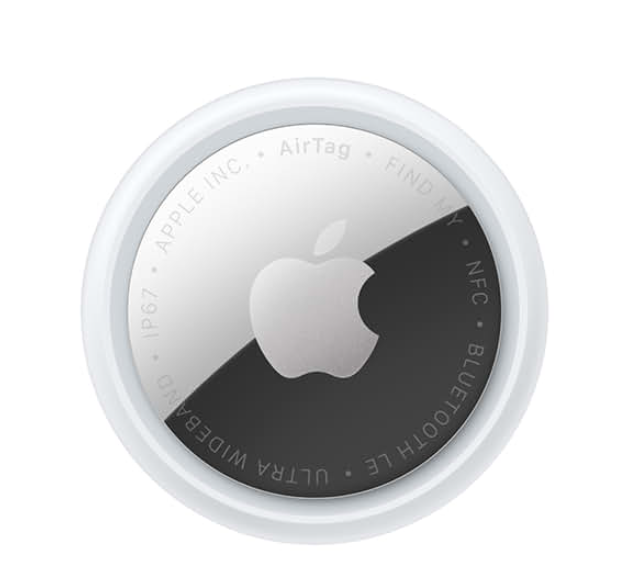
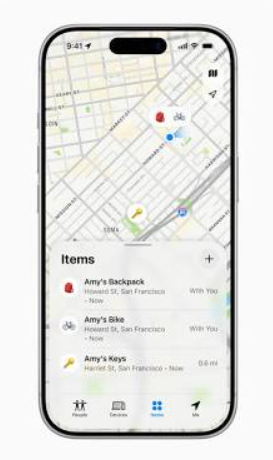
The Apple AirTag (2nd Generation) is a compact, puck-shaped hardware tracker designed to seamlessly integrate with Apple’s native Find My network. Rather than relying on a localized cellular or GPS connection—which would decimate battery life and require a monthly data subscription—the AirTag broadcasts secure, low-energy Bluetooth signals. When a passing Apple device detects these signals, it notes the location and securely relays it to iCloud, allowing the owner to map their missing item.
Core Technical Specifications
| Parameter | Specification |
| Dimensions | 31.9 mm diameter x 8.0 mm thickness (1.26 in x 0.31 in) |
| Weight | 11.8 grams (0.42 ounces) |
| Ingress Protection | IP67 rated (maximum depth of 1 meter up to 30 minutes) |
| Wireless Protocols | Bluetooth Low Energy (LE), Second-Gen Ultra Wideband (UWB), NFC (for Lost Mode) |
| Silicon Architecture | Apple-designed 7nm second-generation UWB chip |
| Audio Hardware | Overhauled internal piezoelectric speaker (~85 dB output) |
| Power Source | User-replaceable CR2032 lithium coin cell battery (lasts 12+ months) |
| Material Composition | 85% recycled plastic housing, 100% recycled gold plating, 100% recycled rare earth magnets |
| System Requirements | iOS 26.2.1 / iPadOS 26.2.1 or later; Apple Watch requires watchOS 26.2.1 or later |
Part 1: The Weaknesses (The Worst)
While Apple’s marketing focuses heavily on the upgraded silicon, a truly objective review must lead with where a product fails its users. In everyday utility, the second-generation AirTag carries over several of the design frustrations that plagued the original.
1. The Accessory Tax: No Native Attachment Hole
Apple has stubbornly retained the exact external dimensions of the first-generation tracker. This means there is still no integrated lanyard or keyring hole on the body of the device. If you buy a standard $29 AirTag to track your keys or a duffel bag, you cannot actually attach it out of the box.
You are immediately forced into buying a secondary case, loop, or key ring. This is a deliberate, margin-maximizing design choice. Apple’s official leather or FineWoven keyrings frequently cost $35—meaning the piece of fabric required to hold the device costs more than the advanced tracking hardware itself. While cheap third-party alternatives exist on Amazon, this “accessory tax” remains an irritating consumer compromise.
2. Chubby Form Factor Destroys Wallet Compatibility
At 8.0 mm thick with a distinctly bulbous, convex shape, the AirTag (2nd Generation) is deeply unsuited for wallets. Sliding this device into a standard leather billfold or a minimalist card slot creates an aggressive, localized bulge. Over time, this stretches the leather, warps plastic credit cards, and creates an uncomfortable lump when sitting down.
Competitors like Tile and Pebblebee offer ultra-thin, credit-card-shaped trackers designed specifically for wallets. Apple’s refusal to offer an alternative, flat form factor forces users to either accept a ruined wallet shape or purchase third-party modifications that dismantle the AirTag’s shell.
3. Absolute Ecosystem Lock-in
The second-generation AirTag is an absolute non-starter if you use an Android smartphone. It cannot be set up, configured, or monitored via an Android device. While Apple partnered with Google to build cross-platform anti-stalking alerts—meaning an Android phone will notify you if an unknown AirTag is traveling with you—you cannot use that network to proactively find your own gear. If your household mixes operating systems, or if you plan to move away from iOS in the future, your investment in these trackers becomes entirely e-waste.
4. High-Gloss Chrome Scratches Within Hours
The design prioritization of aesthetics over utility is highly visible on the AirTag’s stainless steel backing cap. Apple chose a mirror-finish chrome plating that looks premium out of the box but behaves like a scratch magnet in the real world. If tossed into a pocket with house keys or a pocket knife, the metal face will accumulate deep micro-abrasions and scuffs within the first 48 hours of use. While this doesn’t impact tracking performance, it severely degrades the appearance of an expensive gadget.
Part 2: The Strengths (The Good)
Despite its design limitations, the second-generation AirTag features profound internal modifications that cement its position as the most effective close-range and long-range locating device on the market for iOS users.
1. Second-Generation Ultra Wideband: A Massive Range Leap
The standout technical improvement is the introduction of Apple’s second-generation UWB chip (the same silicon node built into modern flagship iPhones). This chip handles “Precision Finding”—the interface that displays an exact directional arrow and distance readouts on your screen as you track down an item.
On the original AirTag, Precision Finding was limited by a short architectural range; you had to be within roughly 10 to 15 meters (30 to 50 feet) for the directional arrow to kick in. Independent, real-world comparative tests demonstrate that the second-generation AirTag expands this threshold dramatically. The “finding” screen now consistently locks onto the tracker from 23 to 24 meters away (75 to 78 feet) in standard indoor environments. This represents a nearly 50% increase in discovery radius, allowing you to establish a precise line of sight to lost keys from rooms away or from entirely different floors of a home.
2. Overhauled Acoustic Pipeline: Finally Audible
The original AirTag’s speaker was quiet, registering a modest 66 decibels (dB) in sound-isolated tests. If buried deep inside a thick couch cushion, wrapped in a winter coat, or hidden inside a gym locker, the chime was incredibly difficult to hear over baseline environmental noise.
For the second-generation model, Apple re-engineered the acoustic chamber and the internal drive coils. In un-laboratory, real-world decibel meter testing, the new AirTag registers an average output of 85 dB. This is a substantial logarithmic increase in sound pressure level. Furthermore, Apple shifted the audio frequency up the musical scale, transitioning from a warm F-note sequence to a shriller, higher-pitched G-note chime. This higher frequency slices through ambient environmental barriers far better, making it easily audible even when muffled by heavy luggage layers or industrial fabrics.
3. Native Apple Watch Precision Finding
For the first time, users do not need to pull out their iPhones to execute a high-precision search. If you own an Apple Watch Series 9, Ultra 2, or later running watchOS 26.2.1, the second-generation UWB chip allows the watch to run Precision Finding directly on your wrist. The watch face transforms into a directional compass, providing visual guidance and distinct, escalating haptic vibrations as you approach the item. This is an exceptional convenience upgrade when your hands are full, or when you are trying to find your car keys while holding groceries.
Part 3: Long-Term Ownership Experience
Item trackers are fundamentally “set-and-forget” utilities. Evaluating them requires looking past the initial setup experience to understand how the hardware behaves over months and years of passive use.
Battery Economics and Maintenance
Unlike many modern accessories, Apple chose not to implement a rechargeable battery cell. The AirTag runs on a standard, non-rechargeable CR2032 lithium coin cell. While this may initially seem primitive compared to USB-C rechargeable trackers, it offers a distinct long-term advantage: zero battery degradation.
Rechargeable lithium-ion pouches built into tiny trackers lose their capacity over 3 to 4 years of temperature exposure, eventually rendering the entire device useless. With the AirTag, when the power runs low after approximately 12 to 14 months of daily use, you simply twist off the back chrome plate and pop in a fresh $1 coin cell.
Critical Warning on Battery Replacements: When purchasing replacement CR2032 batteries for the AirTag (2nd Generation), you must avoid batteries with a bitterant coating. Many battery manufacturers (like Duracell) coat their coin cells in a bitter-tasting substance to prevent accidental ingestion by children. This coating reacts poorly with the recessed, spring-loaded contacts inside the AirTag, often creating a microscopic barrier that prevents the device from powering on entirely. Look for plain, uncoated lithium cells.
Hardened Anti-Stalking Protections
Apple has made massive firmware and structural adjustments to address the dark side of Bluetooth tracking: malicious surveillance. In the original AirTag, bad actors found ways to physically open the casing and desolder or cut the speaker wires, creating a “silent” tracker that could be hidden on a victim’s vehicle.
The internal chassis of the second-generation AirTag features a much thinner, more integrated circuit board design where the speaker housing is physically bonded to the core power conduits. Modifying or disabling the speaker now runs a severe risk of destroying the operational logic gates of the tracking chip itself.
Additionally, the localized alert window has been tightened. If an unauthorized AirTag is separated from its owner and moving with an unregistered device, it will now trigger an acoustic warning chime much faster—rotating through a randomized interval between 8 and 24 hours to prevent predictability.
Part 4: Performance Matrix
To provide a structured evaluation of how the second-generation AirTag performs across key consumer categories, the following matrix breaks down our analytical verdicts and the practical realities behind them.
| Category | Verdict | Practical Reality |
| Build Quality | Excellent / Flawed | The structural assembly feels like a solid, unyielding rock with a great IP67 water rating. However, the surface plastics and mirror-finish chrome scratch almost instantly under normal use. |
| Ease of Use | Industry-Leading | The pairing process is unparalleled: pulling the battery tab next to an iPhone brings up an immediate, one-tap connection card. No third-party apps, accounts, or manual syncing required. |
| Performance | Exceptional | Close-range direction tracking is incredibly fast and highly responsive. The 75-foot Precision Finding threshold completely outclasses the original generation’s real-world range. |
| Features | Good | The inclusion of Apple Watch compass integration and temporal item sharing with up to 5 family members is fantastic. However, it completely lacks alternative flat form factors. |
| Value for Money | Moderate | At $29 for a single tag or $99 for a four-pack, the core entry price is fair. However, when you factor in the mandatory purchase of an accessory holder, the total cost per item rises quickly. |
| Reliability | Unmatched | Because it hooks directly into the massive global Apple Find My network infrastructure, it updates locations in remote or rural areas far faster than any isolated corporate competitor. |
| User Experience | Seamless (with iOS) | Operating natively inside the pre-installed iOS Find My ecosystem provides zero friction, elegant haptics, and clean map overlays. |
Part 5: Competitive Comparison
To understand whether the second-generation AirTag is the right choice, we must contrast it directly against the top alternatives occupying the premium tracking space.
1. Samsung Galaxy SmartTag2
For users entrenched in the Android or Samsung hardware fold, the SmartTag2 is Apple’s primary rival.
- Advantages: Features an integrated, rubber-reinforced keyring hole natively on the chassis, meaning zero accessory costs. It supports both Bluetooth and UWB tracking on Samsung flagship devices.
- Disadvantages: Completely locked into the Samsung SmartThings network. It cannot leverage non-Samsung Android phones or iPhones, significantly limiting its global search network footprint outside of major urban centers.
- Who Should Choose It: Exclusively dedicated Samsung Galaxy smartphone users who refuse to buy external keychains.
2. Chipolo ONE Spot / Pebblebee Clip
These third-party alternatives are fascinating because they are licensed by Apple to use the exact same native Find My network as the official AirTag.
- Advantages: Both models include built-in keychain holes. The Pebblebee Clip features a rechargeable battery via a clip-on magnetic cradle, removing the need to buy coin cells entirely. They also feature flat card variants for thin wallets.
- Disadvantages: They do not contain Apple’s custom second-generation Ultra Wideband chip. Consequently, they completely lack Precision Finding. They cannot show you an arrow or a precise distance readout; they can only show an approximate GPS circle on a map or play an audio chime.
- Who Should Choose It: Apple users looking for a flat wallet card tracker or those who prioritize a native keyring hole over precision directional arrows.
3. Tile Pro
The legacy heavyweight of the standalone tracker industry.
- Advantages: Fully cross-platform. Works identically across iOS and Android devices, making it perfect for households with split-ecosystem hardware.
- Disadvantages: Relies entirely on users who have the proprietary Tile app active on their phones. Because its network scale is a tiny fraction of Apple’s or Google’s native system-level grids, locating a lost item in a rural or low-traffic environment can take days rather than minutes.
- Who Should Choose It: Multi-platform users who switch between Android and iPhone frequently and mostly track items inside their own homes.
Part 6: Buying Verdict
Do NOT Buy This If:
- You use an Android device: The hardware is completely incompatible and cannot be configured or utilized outside of iOS.
- You want a flat tracker for a slim card wallet: The 8.0 mm bulbous center will bend your cards and create an unsightly, structurally damaging bulge in your wallet pocket.
- You own an iPhone older than the iPhone 15: To take advantage of the expanded 75-foot second-generation UWB Precision Finding, your phone must possess the matching modern UWB chip. Older iPhones (from the iPhone 11 through 14) will fall back to legacy, short-range U1 tracking performance.
- You refuse to pay an accessory tax: If you hate the idea of spending an extra $10 to $35 on a case or loop just to hang the tracker on a dog collar or backpack, look toward native-hole competitors.
This Is a Great Buy If:
- You are deeply invested in the Apple ecosystem: If you own an iPhone, iPad, and an Apple Watch Series 9/Ultra 2, the multi-device integration and hand-offs are utterly flawless.
- You frequently misplace items indoors: The combination of a booming 85 dB speaker and an expansive 75-foot directional arrow makes hunting down keys buried under laundry or deep in couch crevices almost instantaneous.
- You travel internationally or check bags frequently: The sheer density of the global Find My network ensures your luggage will update its coordinates on terminal tarmacs and inside baggage holds anywhere in the world within minutes of arriving.
- You want a “set-and-forget” appliance: The 12+ month battery life means you don’t have to manage another charging cable or worry about the device dying mid-trip.
Final Verdict
- Overall Analytical Score: 8.8 / 10
- Best Use Case: High-precision asset tracking for keys, luggage, camera bags, and vehicles within a modern iOS ecosystem.
- Biggest Strength: Unparalleled tracking density via the global Find My mesh network combined with a massively upgraded, 75-foot directional Precision Finding range.
- Biggest Weakness: Antagonistic, hole-free product design that mandates an additional accessory purchase to attach to basic items.
- Final Recommendation: If you are an iPhone user seeking absolute peace of mind for your valuables, the Apple AirTag (2nd Generation) remains the undisputed gold standard of item tracking. The massive range boost and much louder speaker fully justify choosing it over the aging first-generation model. However, you must budget an extra $10 for a third-party keychain shroud, and look elsewhere if you need a tracker thin enough for a wallet.
Product Link Section
The second-generation AirTag represents a vital security layer for your everyday carry gear. To see current promotional pricing, read verified user field reports, or secure a discounted four-pack for your upcoming travel schedule, explore the live listing directly on Amazon:
Check Current Price and Availability on Amazon
FAQ Section
Q1: What is the main difference between the 1st Gen and 2nd Gen AirTag?
The external dimensions are identical, but the internal hardware is thoroughly upgraded. The 2nd-generation AirTag features a modern Ultra Wideband chip that boosts Precision Finding range by roughly 50% (up to 75 feet vs. 50 feet). It also features an acoustic redesign that is 50% louder (reaching 85 dB compared to 66 dB), natively supports directional finding directly on modern Apple Watches, and has a structurally reinforced chassis that prevents malicious speaker removal.
Q2: Does the 2nd Gen AirTag require a monthly subscription fee?
No. Unlike dedicated GPS trackers that require a cellular SIM card and an ongoing data plan, the AirTag leverages existing Bluetooth networks provided entirely for free by passing Apple devices. Once you buy the hardware, there are absolutely zero ongoing subscription costs or software fees.
Q3: Can I use the new AirTag to track my dog or cat?
Apple’s official stance is that AirTags are engineered exclusively to track inanimate objects (keys, bags, bikes), not living beings. Because the AirTag relies on a mesh network of passing iPhones, if your pet gets lost deep in a dense forest or rural area where no humans walk by with an iPhone, the tracker will not be able to update its location. For active pets, a dedicated cellular/GPS pet collar tracker is a safer option, though an AirTag works well as a cheap secondary backup in urban environments.
Q4: Will the 2nd Gen AirTag fit inside a standard ridge or leather wallet?
It will physically fit inside the cash pocket or a card slot, but it is highly unrecommended. Because it is 8.0 mm thick and shaped like a dome, it will stretch out your wallet materials and create a highly visible, raised circle. If wallet tracking is your primary goal, you should look into third-party trackers like the Pebblebee Card or Chipolo CARD Spot, which are officially authorized to use Apple’s Find My network but are thin enough to match two stacked credit cards.
Q5: How do I know when the battery is dying, and how hard is it to change?
When the internal CR2032 battery falls below 15% capacity, your iPhone will push a persistent notification alerting you that the battery needs replacement. Changing the battery takes less than ten seconds: you simply press down firmly on the stainless steel backing plate with two thumbs, rotate it counter-clockwise, lift the cap, swap out the coin cell, and twist the cap back on clockwise until it clicks.
Q6: Can I temporarily share my AirTag’s location with someone else?
Yes. Running modern iOS versions allows you to share an AirTag with up to five other people via the Find My app. This is incredibly useful for shared household assets like a family car keychain, a shared camera kit, or luggage when traveling with a partner. Sharing the item ensures that other family members won’t trigger automatic “Unknown Tracker Detected” anti-stalking warnings on their own iPhones while traveling with the shared item.