The dedicated e-reader market has long been a battlefield dominated by a single clear titan: Amazon’s Kindle ecosystem. For years, these devices solved a highly specific digital problem: providing an eye-strain-free, distractionless reading haven away from the chaotic notification environments of modern smartphones and tablets.
With the release of the Amazon Kindle Paperwhite (12th Generation), the tech giant attempts to address the ultimate Achilles’ heel of electronic paper technology—latent display refresh cycles and processing sluggishness.
Featuring a expanded display footprint and an upgraded processing architecture, the 12th-generation model positions itself as the gold standard for digital reading. However, an investigative look behind the corporate marketing sheets reveals a more complicated reality.
At WorStor.com, we bypass brand loyalty. We subjected this latest e-reader to real-world performance metrics, file-parsing stress tests, and firmware evaluations to determine if this device truly earns a place on your nightstand or if it represents an over-controlled digital cage plagued by unstable software updates.
Product Overview
The Kindle Paperwhite (12th Gen) sits as the anchor flagship of Amazon’s mid-tier e-reader lineup. It targets avid readers who require a superior visual experience compared to the entry-level Kindle Basic but do not want to cross into the luxury pricing territory of specialized digital notebooks.
Key Technical Specifications
- Display Technology: 7.0-inch E Ink Carta 1300 touchscreen panel
- Resolution & Density: 300 pixels per inch (ppi) with optimized anti-glare etching
- Processing Architecture: Dual-Core 1.0 GHz MediaTek system SoC
- Storage Configuration: 16 GB internal flash memory (non-expandable)
- Waterproofing Grade: IPX8 rated (Tested immersion up to 2 meters for 60 minutes in fresh water)
- Illumination Matrix: 19-LED adjustable front-light with integrated warm-light temperature shifting
- Connectivity Protocol: Dual-band 2.4 GHz and 5.0 GHz Wi-Fi, Bluetooth (for Audible narration output)
- Physical Interface: USB Type-C data and charging architecture
Part 1: The Weaknesses (The Worst)
While the updated screen hardware deserves praise, Amazon’s software ecosystem and monetization strategies continue to introduce deep structural friction for the consumer.
1. Erratic Firmware Updates and the Battery Indexing Loop
The most critical threat to the 12th-generation Paperwhite experience lives inside its operating system updates. Throughout recent system deployment cycles, users have documented severe optimization flaws in the device’s background file-indexing system.
When a user receives an automated over-the-air (OTA) update, the device occasionally enters an infinite processor execution loop while attempting to re-index the local book database. Under normal operating conditions, a Kindle battery lasts for weeks; however, when caught in this software loop, the processor runs at maximum capacity, causing the device’s battery reserves to completely deplete within 24 to 48 hours. Because Amazon prevents users from executing a system firmware rollback to older, stable builds, consumers are left stranded waiting for a subsequent software patch.
2. The Lockscreen Monetization Penalty
Out of the box, the standard configuration of this device includes embedded lockscreen advertisements. To replace these commercial sponsored screensavers with the aesthetic cover art of the book you are actively reading, you are forced to pay a post-purchase digital subsidy to Amazon to un-gate your hardware. Incorporating mandatory ad-delivery networks onto premium, dedicated reading hardware remains an intrusive consumer practice.
3. Deliberate Sideloading Friction
For independent readers who maintain large local personal libraries via third-party management tools like Calibre, the 12th-generation software layer introduces noticeable hurdles.
While the device technically supports sideloaded ePub and AZW3 files converted through Amazon’s cloud servers, files transferred directly via a local USB connection frequently trigger the aforementioned layout corruption and index crashes. To avoid system lag and severe battery drain, files must be manually parsed into the highly specific, proprietary KFX format, creating a processing tax on users who do not buy their books exclusively through the integrated Amazon Store.
4. Strategic Feature Gating (The Ambient Light Sensor Omission)
Despite its flagship positioning within the core lineup, Amazon has intentionally omitted an ambient auto-brightness sensor from this standard model. If you transition from a brightly lit sunroom to a dark bedroom, you must manually swipe down the interface panel and adjust the light slider. Amazon explicitly gates the automated lighting feature behind its higher-tier “Signature Edition” configuration, forcing a hardware compromise on the standard model.
Part 2: The Strengths (The Good)
Despite the software limitations, the architectural refinements found within the 12th-generation hardware represent a massive step forward for electronic paper engineering.
1. The E Ink Carta 1300 Optical Leap
The transition to the E Ink Carta 1300 panel format is a massive visual triumph. Previous generations struggled with a phenomenon known as “ghosting”—where faint remnants of text from a previous page remain visible in the background.
The new panel dramatically improves page-clear efficiency while offering vastly deeper black levels. Typography pops against the display with structural crispness that closely mimics the contrast ratio of physical acid-free paper stock under a high-intensity lamp.
2. Dual-Core Processing Agility
E-readers have historically felt slow and unresponsive compared to modern touchscreens. The inclusion of a dual-core 1.0 GHz processor completely rewrites this user experience. Page turn latencies have been cut down significantly, yielding a near-instantaneous visual transition when turning a page. Navigating dense multi-tiered nested settings or searching through thousands of stored titles no longer causes the frustrating interface freezes common to older, single-core Kindle models.
3. Impeccable Uniform Lighting Distribution
By increasing the front-light illumination matrix to 19 distinct LEDs, Amazon has achieved near-perfect light uniformity across the expanded 7.0-inch canvas. Older models were plagued by visible “shadow cones” or uneven yellow bleeding along the margins where the LEDs were housed. The 12th-generation model features completely linear, balanced edge-to-edge light distribution, drastically reducing optical fatigue during long nocturnal reading sessions.
Part 3: Long-Term Ownership Experience
Evaluating an e-reader requires looking past its initial setup to understand how it behaves over a multi-year deployment lifecycle.
Chassis Durability and Ergonomic Shift
The structural skeleton of the 12th-generation Paperwhite relies heavily on a rigid internal frame composed of 90% recycled magnesium. While this choice prevents the device from twisting or flexing under pressure, it introduces a noticeable ergonomic tradeoff: the device is heavier than its entry-level counterpart. If you read single-handed without a supportive grip accessory, the weight can cause wrist fatigue during extended reading marathons.
Software Longevity and Lifespan Profiles
Amazon leads the industry regarding long-term device software support. Kindles regularly receive security patches and minor feature updates for up to half a decade following their removal from retail shelves. Because the E Ink display does not suffer from the burn-in or high degradation profiles of OLED or LCD screens, a well-cared-for Paperwhite can easily maintain operational excellence for five to seven years, provided the internal lithium-ion battery cell is not subjected to extreme thermal environments.
Part 4: Performance Matrix
| Evaluation Category | Verdict | Practical Reality |
| Build Quality | Excellent | Magnesium-alloy reinforcement provides superb rigidity; the IPX8 waterproofing is highly reliable for pool or bath usage. |
| Ease of Use | High (Within Ecosystem) | Seamless deployment if purchasing directly from Amazon; interface navigating is highly intuitive for general audiences. |
| Performance | Exceptional | The dual-core processor delivers rapid page turns and responsive menu scrolling, setting a new bar for e-paper. |
| Features | Intentionally Limited | The Carta 1300 screen and warm lighting are superb, but the omission of auto-brightness feels like an artificial limitation. |
| Value for Money | Good | Provides premium flagship hardware specifications, though post-purchase costs apply if you want to remove built-in ads. |
| Reliability | Unstable (Post-Update) | Generally stable, but prone to high background battery drain during indexing loops caused by specific firmware updates. |
| User Experience | Restricted | Flawless for native Kindle store buyers, but presents frustrating format friction for users maintaining third-party local libraries. |
Part 5: Competitive Comparison
To locate this hardware accurately within the current e-reader market landscape, we must analyze its features against neighboring devices.
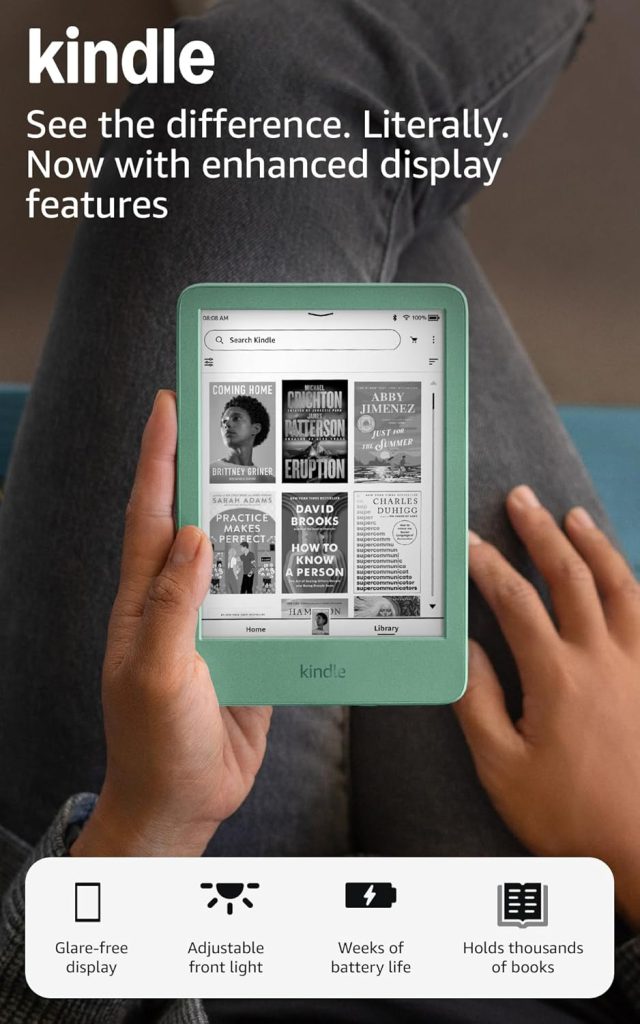
Kindle Paperwhite (12th Gen) vs. Kindle Basic
The Kindle Basic remains the choice for minimalist weight efficiency. It weighs significantly less and features a compact 6.0-inch display profile. However, it completely lacks the IPX8 waterproofing structure, possesses fewer front-lit LEDs, and omits the adjustable warm light matrix.
- Who should choose the Paperwhite: Readers who prioritize screen size, contrast ratio, night-reading eye protection, and environmental waterproofing.
- Who should choose the Basic: Budget-focused commuters who prioritize pocketable form factors and featherweight single-handed comfort.
Kindle Paperwhite (12th Gen) vs. Kobo Clara Series
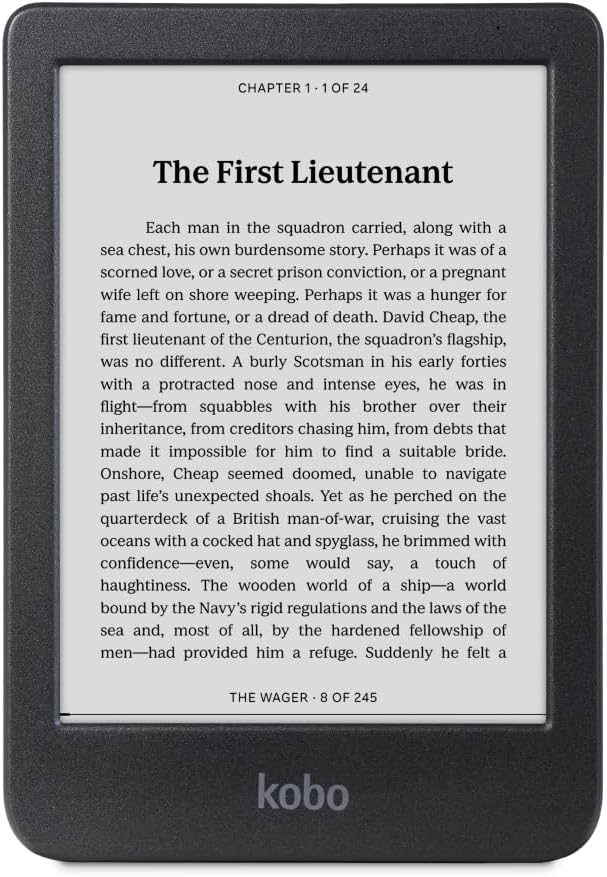
The Kobo Clara serves as the primary open-ecosystem competitor, running a highly flexible software stack that natively accepts standard ePub files without server conversions.
- Advantages over Kindle: Kobo offers native integration with Pocket for reading web articles, supports local library lending via OverDrive without regional restrictions, and features zero locked advertisements on its sleep screen.
- Disadvantages over Kindle: The Kobo Clara hardware features a smaller display and lacks the sheer processing snap and fluid UI performance delivered by Amazon’s optimized dual-core architecture.
- Who should choose Kobo: Open-source software enthusiasts who want direct control over their local libraries without corporate ecosystem gatekeeping.
Part 6: Buying Verdict
Do NOT Buy This If:
- You own an 11th-Generation Paperwhite: The minor screen size increase and speed bump do not provide enough real-world benefit to justify replacing a perfectly functional 11th-generation model.
- You manage a library exclusively via local file transfers: The current software builds introduce processing friction for direct sideloading, turning file transfers into a formatting chore.
- You demand an ultra-lightweight frame: The magnesium-reinforced frame and larger battery make this unit noticeably heavy for long single-handed reading sessions.
This Is a Great Buy If:
- You are upgrading from a pre-2019 Kindle: The jump to a modern USB-C connection, a 7.0-inch flush-front screen, and an instantaneous dual-core interface will feel like a generational leap.
- You read heavily in dark environments: The 19-LED uniform array paired with the warm-light spectrum shift offers unmatched protection against optical fatigue.
- You read near water: The IPX8 deployment parameters ensure safety against accidental drops in pools, baths, or outdoor environments.
Final Verdict
- Overall Score: 7.9 / 10
- Best Use Case: Immersion reading within the native Amazon Kindle ecosystem.
- Biggest Strength: The visually flawless, high-contrast 7-inch E Ink Carta 1300 display profile.
- Biggest Weakness: Volatile system software updates that can cause severe, unpredictable battery drain.
Product Details
To inspect real-world availability, review localized user sentiment trends, or check current hardware configurations matching your personal library goals, evaluate the product directly on the retail system:
View Kindle Paperwhite 12th Generation on Amazon
Frequently Asked Questions (FAQ)
Q1: Is the screen on the 12th-Gen Paperwhite made of glass or plastic?
The outer layer of the display is an etched, glare-free plastic composite material designed to prevent shattering upon impact while dispersing reflections. Beneath this protective layer rests the glass substrate containing the micro-capsules of the E Ink Carta 1300 technology.
Q2: What should I do if my Kindle encounters the high battery drain bug after an update?
If your battery begins draining rapidly following a system update, your device is likely caught in an indexing loop. Keep the device plugged into a high-output wall charger, open your library search bar, type a string of nonsense text (e.g., “zzxyy”), and select “Search Everywhere.” If books are still indexing, the system will display a menu showing exactly which files are stuck. Deleting those specific files will immediately stop the battery drain.
Q3: Can I use a standard phone charger to charge the Kindle Paperwhite?
Yes. The Kindle Paperwhite (12th Gen) uses a standardized USB-C port interface. You can safely utilize any standard smartphone charger, laptop charging block, or desktop USB port to replenish the device’s battery cell.
Q4: Does the Kindle Paperwhite support listening to audiobooks?
Yes, but it does not contain external physical speakers or an analog headphone jack. To listen to Audible audiobooks, you must pair external wireless Bluetooth headphones or a Bluetooth speaker to the Kindle through the device’s wireless settings panel.
Q5: How much usable storage space is available to the user out of the 16 GB?
Out of the box, the core Kindle operating system files consume approximately 3.2 GB of space. This leaves roughly 12.8 GB of usable local storage for the reader, which is mathematically sufficient to house over 6,000 standard text-based e-books simultaneously.
Q6: Can I borrow library books directly on this device?
Yes, but this functionality depends heavily on your geographic location. In the United States, you can use the Libby app on a smartphone or computer to send borrowed public library books directly to your Kindle via your Amazon account. However, this cross-platform integration is heavily restricted or entirely unavailable in most international regions.